DataBuff v0.1.7 is ready: platform self-monitoring and self-troubleshooting land—the Deploy Status page watches ingest / web / Doris, and the product Q&A expert can inspect, diagnose, and apply fixes. Also improved non-HTTP endpoint analysis, isolated services on the global topology, multi FE/BE host lists, and faster span queries. Versus v0.1.6: 31 commits, schema migration V007 (metric_platform).
Highlights
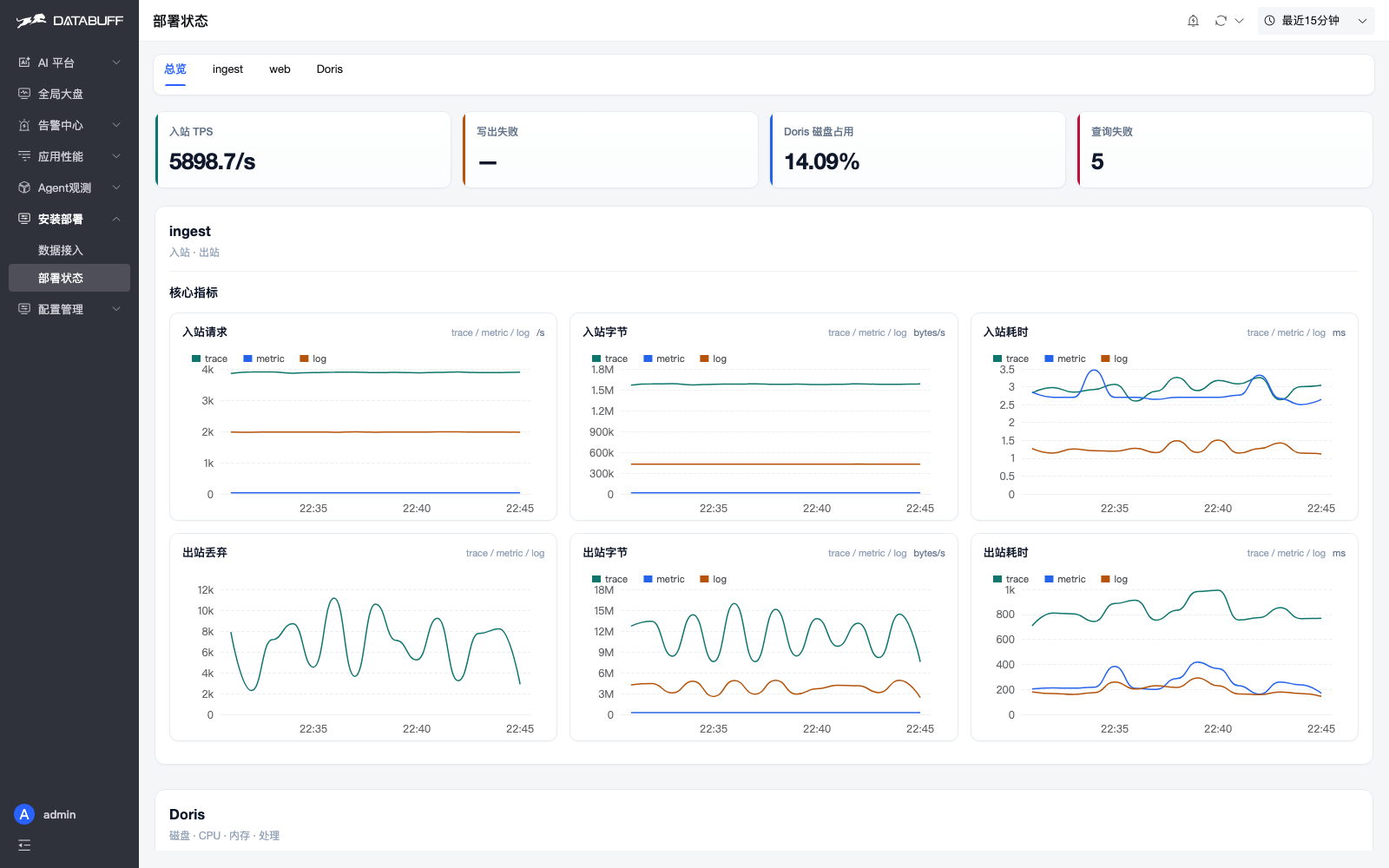
- Platform self-monitoring & self-troubleshooting: new Deploy Status page (Install → Deploy Status) with inbound TPS, write failures, Doris disk, and query errors; ingest / web / Doris tabs; metric title drawers explain computation and env knobs.
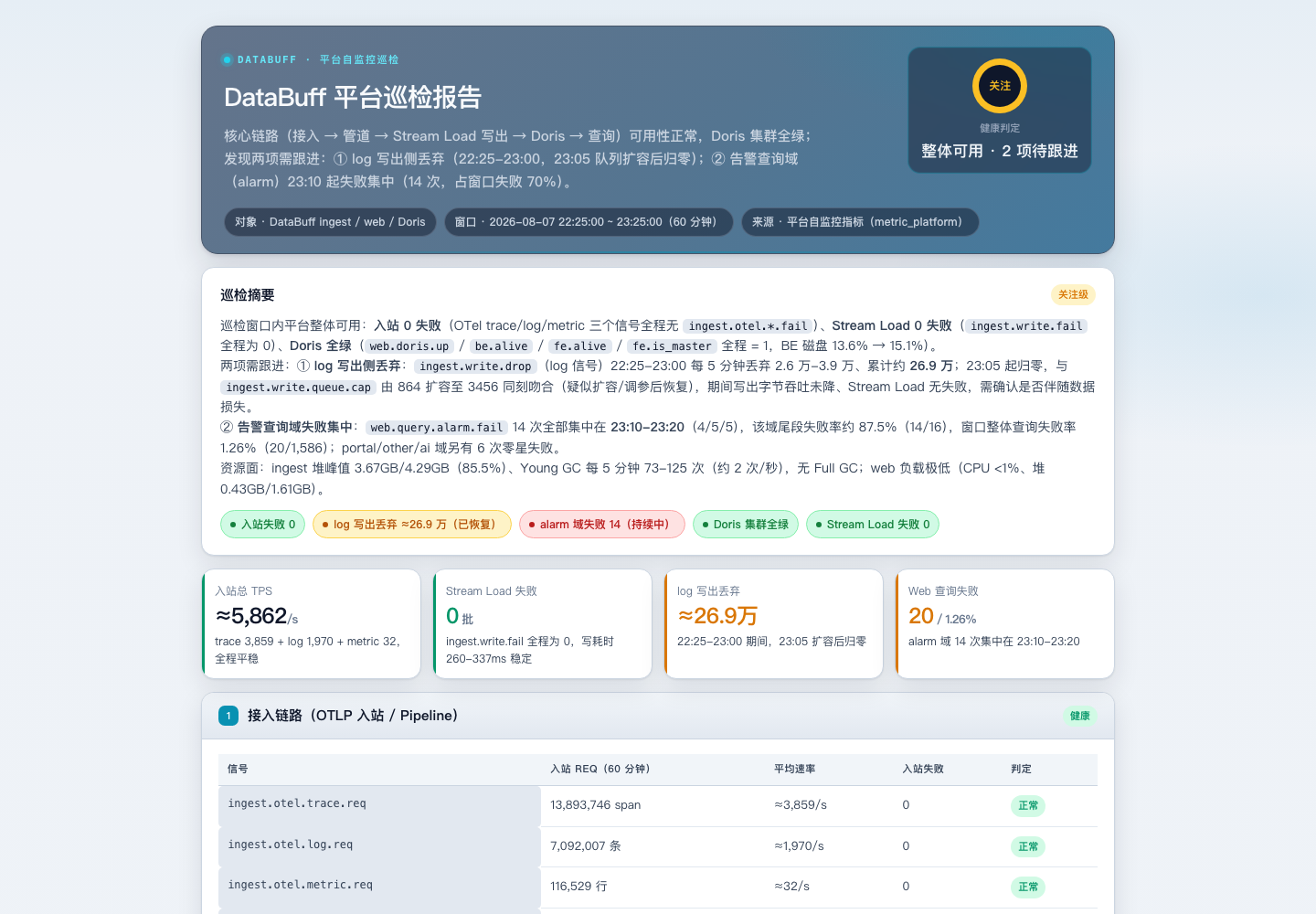
- AI inspection & self-ops fixes: the product Q&A expert reads the metric catalog, queries platform telemetry, outputs HTML inspection reports, traces drop chains, and in v0.1.7 can apply fixes (login, backup config, tune env, restart ingest, verify).
- QA Doris read-only query:
POST /webapi/api/v1/ai/doris/queryand built-inplatform.queryDorisfor read-only platform config/data checks without ad-hoc DB connections. - Non-HTTP endpoint analysis:
resourceInfo/resourceRelationsupport non-HTTPcomponentTypes; drill-down filters and slow/error paths for DB / MQ / RPC bases expanded. - Service classification & topology: web vs virtual middleware types from span/componentId recognition; global topology shows isolated services when no call edges; service-flow cards allow two-line service names.
- Multi FE / multi BE:
DORIS_FE_HOST/DORIS_BE_HTTP_HOSTaccept comma-separated host lists with health round-robin failover (see section below). - Faster span queries: span queries prune with a minute key and skip
call_spansCOUNT; trace charts aggregate from spans when filtering by TraceID. - Alarms & MCP: monitor rules honor
lt/lte/gtecomparators and warning thresholds; remote MCP headers applied after transport; AI chat Mermaid renders per-node with syntax-repair fallback. - UX fixes: log list descending time order; chat stops auto-scroll while the user reads earlier messages;
getCurrentTimeRangeend handling fixed.
How to use: platform self-monitoring (Deploy Status)
Path: Install → Deploy Status (/deploy/status). Start with the four overview cards: inbound TPS, write failures, Doris disk, query errors. Sustained non-zero write failures or pipeline drops need attention.
- ingest tab: how each signal (trace / metric / log) is received, processed, and written—and whether anything is dropped.
- web tab: platform query latency and errors.
- Doris tab: storage node liveness, disk, and CPU.
- Metric help drawers: click any chart title for computation, when to worry, and which env var to tune.
How to use: AI inspection & self-troubleshooting
In the AI Platform, tell the product Q&A expert: “Inspect the DataBuff platform and produce an HTML inspection report.” It reads the metric catalog, queries platform metrics, and produces a shareable HTML report. On write drops it can walk the batch → write queue → Doris chain and suggest knobs such as INGEST_DORIS_MAX_READY_BATCHES. In v0.1.7 it can also apply the fix (login, backup, change config, restart ingest, recheck).
Full walkthrough and metric tables: Platform self-monitoring · Self-monitoring metric catalog.
Endpoint analysis & topology (brief)
v0.1.7 also completes non-HTTP endpoint (DB / MQ / RPC) base info, call history, slow, and error drill-downs—navigating from service detail now carries the correct componentType. The global topology still draws isolated services when there are no call edges. Span lists prune by minute key and skip extra call_spans COUNT; TraceID-filtered charts aggregate from spans.
How to use: multi FE / multi BE
For a multi-node Doris cluster, Web / Ingest accept comma-separated host lists: queries use multi FE, Stream Load uses multi BE, with health failover and periodic /api/health probes. Single-node one-line installs are unchanged.
- Query: set
DORIS_FE_HOSTon both Web and Ingest (JDBC, default port 9030). Multi FE automatically usesjdbc:mysql:loadbalance://.... - Write (recommended): set
DORIS_BE_HTTP_HOSTon Ingest only for direct Stream Load to BE:8040 with multi-BE health round-robin. Keep BE configured (Docker default). - Without BE: writes hit FE:8030 then 307 to BE—less stable for split deployments.
Address forms (same rules for FE / BE): single host fe1 / be1; multi-host shared port fe1,fe2 / be1,be2; per-entry ports fe1:19030,fe2:19031 / be1:8040,be2:8041.
# Docker: write docker-compose.override.yml for external Doris / address changes
services:
  ai-apm-web:
    environment:
      DORIS_FE_HOST: "192.168.1.10,192.168.1.11"
      DORIS_FE_QUERY_PORT: "9030"
  ai-apm-ingest:
    environment:
      DORIS_FE_HOST: "192.168.1.10,192.168.1.11"
      DORIS_FE_QUERY_PORT: "9030"
      DORIS_BE_HTTP_HOST: "192.168.1.20,192.168.1.21"
      DORIS_BE_HTTP_PORT: "8040"
Then docker compose up -d ai-apm-web ai-apm-ingest. On Kubernetes, put the same vars in ConfigMap ai-apm-config and rollout restart. Table replicas (replication_num ≥ 2) complement the app-side host list. Full port guide: Parameter configuration §3.
Install & upgrade
Fresh install: Docker deployment. Existing setups: Upgrade & uninstall. This release includes schema migration V007 (adds metric_platform, schema_version → 7); the upgrade script runs it automatically. Kubernetes does not support in-place upgrade this release—uninstall then reinstall.
# New install (clears old install dir and data/)
curl -fsSL https://databuff.ai/databuff/ai-apm-install.sh | bash

# Existing users upgrade (keeps data/)
curl -fsSL https://databuff.ai/databuff/ai-apm-update.sh | bash